 Navigating Menu Management Application
About
The Menu Management Application allows you to create menus with categories containing products.
In the Menu Management Application, you can:
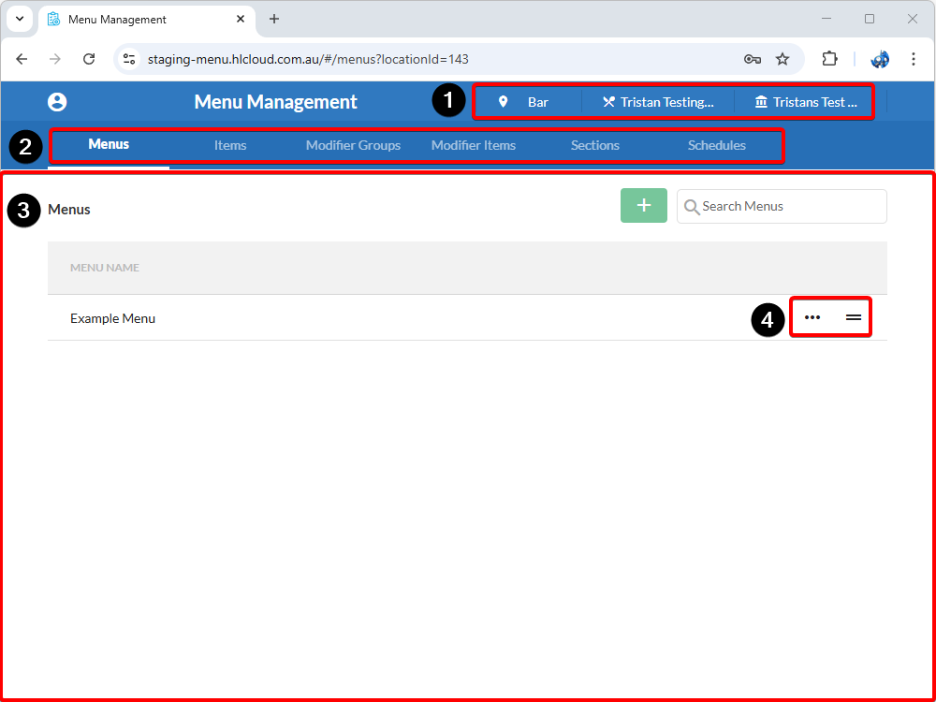
- Change the organisation, venue, and location Menu Management is using (if you have access to more than one).
- Navigate through the different pages of the Menu Management Application, including:
- Menus – List of menus used by various H&L and 3rd party applications.
- Items – List of all items that can be added to a menu. Sysnet on premise PLUs can be uploaded and synchronised.
- Modifier Items – Lists of modifier items that can be added to a modifier group. Sysnet on premise modifier PLUs can be uploaded synchronised.
- Modifier Groups – List of modifier groups which contain groups of modifier items.
- Sections – Currently not used by any H&L or 3rd party applications.
- Schedules – Currently not used by any H&L or 3rd party applications.
- View, create and search for records relevant to the selected page:
- Left-click a listed record to view more details.
- Use the + button to create new records.
- Use the Search field to locate specific records.
- Interact with existing records:
- Use the ••• button (if available) to rename, edit, or delete a record.
- Use the ═ button (if available) to click and drag records to reorder them in the list.
 (
(
Was this article helpful?
That’s Great!
Thank you for your feedback
Sorry! We couldn't be helpful
Thank you for your feedback
Feedback sent
We appreciate your effort and will try to fix the article